
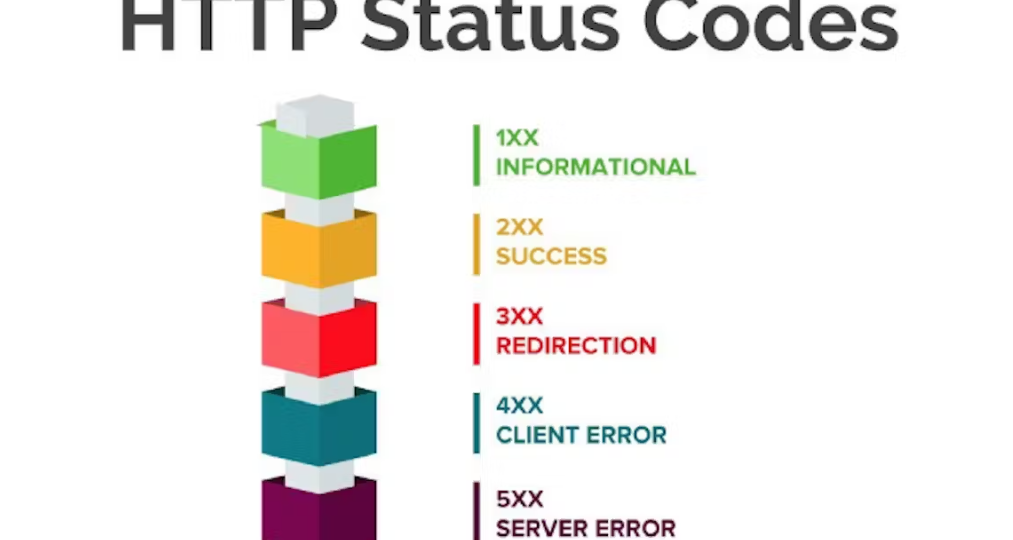
Here’s the cheat sheet every modern marketer needs.
What Are HTTP Status Codes (And Why Should Marketers Care)?
HTTP status codes are server responses to a browser request.
When someone visits your website, clicks a link, or submits a form, your server responds with a status code that tells search engines and browsers what happened.
If those responses are wrong?
- Your SEO suffers.
- Your ad campaigns waste budget.
- Your users get frustrated.
- Your credibility drops.
In today’s AI-powered search ecosystem—especially within platforms like Google Search—clean technical signals are more important than ever.
Search engines reward technically sound websites.
Let’s break down the codes that matter most.
1xx – Informational (Rarely a Marketing Concern)
These codes mean the request was received and is being processed.
Marketers rarely deal with these directly, but developers might during advanced configurations.
Not your biggest worry.
2xx – Success Codes (What You Want to See)
200 – OK
This is the gold standard.
It means:
- The page loaded successfully.
- Search engines can crawl it.
- Users can access it.
If your core landing pages aren’t returning 200 status codes, something is very wrong.
Use tools like:
- Google Search Console
- Semrush
- Ahrefs
…to monitor crawl health.
204 – No Content
This means the request succeeded but there’s no content to return.
It’s sometimes used in form submissions or API calls—but if used incorrectly on landing pages, it can hurt indexing.
3xx – Redirection Codes (Handle With Care)
Redirects are powerful. They can preserve SEO—or destroy it.
301 – Permanent Redirect
This tells search engines:
“The page has permanently moved.”
Use it when:
- Rebranding
- Changing URLs
- Migrating to HTTPS
- Consolidating duplicate content
A properly implemented 301 passes most SEO value.
Poorly implemented redirect chains? That’s ranking leakage.
At ONEWEBX, we audit redirect structures during every site migration.
302 – Temporary Redirect
This signals:
“The move is temporary.”
Search engines may not pass full SEO value.
Use sparingly and strategically.
304 – Not Modified
This is a caching response.
It improves performance and reduces server load.
In 2026, website speed impacts both user experience and Core Web Vitals—so smart caching setups matter more than ever.
4xx – Client Errors (These Hurt)
These are red flags for marketers.
404 – Not Found
The infamous 404.
It means the page doesn’t exist.
Common causes:
- Deleted blog posts
- Broken internal links
- URL typos
- Poor site migrations
Why it matters:
- Bad user experience
- Lost SEO equity
- Wasted ad spend if linked in campaigns
Always:
- Redirect valuable old URLs
- Customize your 404 page
- Monitor regularly via Google Search Console
A smart 404 page can even turn a mistake into a conversion opportunity.
403 – Forbidden
The server understood the request but refuses access.
This may happen due to:
- Incorrect permissions
- Firewall rules
- Security misconfigurations
If search engines are blocked accidentally, your rankings disappear.
410 – Gone
This is stronger than 404.
It tells search engines the content is permanently removed.
Useful when cleaning outdated or low-quality content—but must be used intentionally.
5xx – Server Errors (Urgent Fix Required)
These indicate server-side problems.
And they’re dangerous.
500 – Internal Server Error
Something broke.
Could be:
- Plugin conflict
- Server overload
- Faulty code
- Hosting issue
Search engines encountering repeated 500 errors may temporarily de-index pages.
502 – Bad Gateway
Often caused by:
- CDN misconfiguration
- Server communication failure
- Hosting problems
If you’re using platforms like Cloudflare for CDN and security, configuration errors can trigger this.
503 – Service Unavailable
Usually appears during:
- Server maintenance
- Traffic spikes
- Resource overload
Proper hosting infrastructure prevents this—especially during high-traffic campaigns.
Why HTTP Status Codes Matter More in 2026
Today’s digital landscape includes:
- AI-powered search summaries
- Mobile-first indexing
- Core Web Vitals ranking factors
- Privacy-first tracking
- Real-time performance monitoring
Technical SEO isn’t optional anymore.
If your website sends mixed signals through incorrect status codes, AI-driven search systems deprioritize your content.
Performance + technical clarity = visibility.
How to Check Your Website’s Status Codes
Modern marketers should regularly audit their site using:
- Google Search Console
- Semrush
- Ahrefs
- Screaming Frog SEO Spider
These tools identify:
- Broken links
- Redirect chains
- Crawl errors
- Server issues
- Indexing problems
Think of it as a routine health check for your website.
Common Mistakes We See at ONEWEBX
- Launching paid ads to 404 pages
- Not redirecting old URLs during redesign
- Blocking search engine crawlers accidentally
- Allowing redirect chains to stack
- Ignoring crawl errors for months
Your marketing campaigns are only as strong as your technical foundation.
The ONEWEBX Approach to Technical Excellence
We don’t separate marketing from infrastructure.
Every website we build or optimize includes:
- Technical SEO audit
- Redirect mapping strategy
- Crawlability testing
- Performance optimization
- Hosting evaluation
- Ongoing monitoring